


Sushi Maker Kids Cooking Games
4.7439.00 Reviews
App Specs
- Version
- 1.23
- Updated On
- License
- Free
- Downloads
- 10,000,000+
- Developer
- Pazu Games
- Categories
- Role Playing
- Platform
- Android, iOS
Screenshots



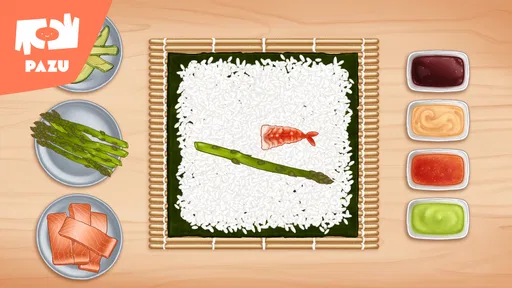




 Analysis by AppCompare
For a quick shared-device game, I like the idea of giving a child a creative activity that feels more hands-on than watching a video. Sushi Maker Kids Cooking Games turns sushi preparation into a colorful sequence of small actions, so it can suit a short break at home, a quiet stretch in a waiting room, or a turn-taking moment between siblings. It is best approached as playful pretend cooking, not as a serious cooking lesson: the appeal is making and decorating virtual food, with no real ingredients or kitchen cleanup involved.
A good fit for short, shared turns
On a family tablet or phone passed between children, this kind of role-playing game can work well because the goal is immediately understandable. One child can choose and assemble a sushi creation, then hand the device over for another turn. I would keep the activity casual rather than turn it into a contest: younger players may enjoy experimenting with the steps, while an older sibling can help explain what to try next without taking over.
A realistic use is the few minutes before dinner, when an adult is busy and a child wants something to do nearby. The game offers a food-making theme without asking the child to handle knives, raw ingredients, or kitchen equipment. That makes it a convenient screen activity, though it does not replace adult-led cooking if the aim is to learn real food preparation.
Keep expectations clear on a shared device
When several people use the same device, I find it helps to agree on turns and on whether a child may change anything another player has started. That simple boundary can prevent the familiar sibling dispute over who gets to choose the next ingredient. I would also treat the game as one activity among others, rather than assuming it will occupy a child indefinitely; a short, defined play window is often easier to manage than an open-ended session.
Parents should make their own choices about device access and supervision. The game’s child-oriented presentation may feel approachable, but a shared phone or tablet still has the household’s other apps and settings around it. Keeping the device in a child-appropriate environment, and staying nearby when that is part of your family’s routine, is a sensible approach without expecting the game itself to manage account boundaries or sibling coordination.
Who will enjoy the cooking theme
I can see this appealing most to children who like pretend play, bright food visuals, and simple creative tasks. It can also be a low-pressure option for an adult to try alongside a child: taking turns choosing ingredients gives you an easy way to talk about sushi and familiar foods without needing to know much about cooking. The game’s role-playing format is more about imaginative participation than mastering a demanding system.
On the other hand, children who want a fast-paced challenge, a deep story, or a competitive multiplayer experience may find the cooking focus too gentle. Adults looking for a realistic sushi tutorial should also choose a real recipe or cooking resource instead. Virtual assembly can make the idea of food preparation engaging, but it does not teach practical kitchen skills by itself.
Worth Reading Before You Choose

EA SPORTS FC Mobile 26 Is a Bigger Football Game, but It Takes Time

Flipboard Shows What News Apps Must Do Beyond the Feed

Switching to Android Auto Means Rethinking Your Driving Routine

Google Calendar Makes a Crowded Week Easier to Manage

Ludo King Makes the Most of the Minutes Between Plans

Baby Panda World Brings Quick Play to Modern Phones, but Its Game Library Feels Busy
Getting Started with Sushi
Right off the bat, Sushi Maker Kids Cooking Games makes it easy for anyone to jump in. The interface is intuitive, with bold colors and simple instructions that guide you through the sushi-making process. Whether you're a seasoned chef or someone who has never picked up a pair of chopsticks, this app ensures you won't feel lost. The playful animations and engaging sound effects add a layer of fun that keeps you hooked.
The Art of Sushi Making
The core of the game is, of course, making sushi. The app provides a wide array of ingredients and tools to create your masterpiece. From sticky rice and fresh fish to nori and vegetables, you have everything you need to roll the perfect sushi. The app does a fantastic job of simulating the cooking process, giving you the sensation of actually preparing real sushi. It's both educational and entertaining, making it a great choice for young aspiring chefs.
Each step is interactive, allowing you to spread the rice, layer the ingredients, and roll your sushi with a flick of your finger. The tactile feedback is surprisingly satisfying, and the end results are often as colorful and creative as your imagination allows. It's not just about following recipes; it's about exploring your culinary creativity.
Challenges and Rewards
To keep things exciting, the app includes various challenges and rewards. Completing tasks earns you special ingredients and decorations to enhance your sushi creations. It's a clever way to keep players engaged, offering a sense of progression as you improve your skills. The challenges are well-balanced, catering to different skill levels, which makes the game accessible to a wide audience.
The Kid-Friendly Factor
One of the standout features of Sushi Maker Kids Cooking Games is its kid-friendly design. The app is free from in-app purchases and advertisements that can often disrupt the experience. Parents can rest easy knowing their kids are playing in a safe environment. The educational aspect of the game is also a huge plus, subtly teaching children about different ingredients and culinary techniques.
Moreover, the vibrant graphics and cheerful music make it an app that kids will want to return to again and again. It's the kind of game that can keep them entertained during long car rides or while waiting for appointments, without requiring constant supervision.
Room for Improvement
Compared with many role-playing games that emphasize long character arcs, elaborate worlds, or battles, this one keeps its attention on a small, familiar activity: putting together sushi. That narrower focus is useful when you want a gentle game that can be picked up briefly, but it also means players seeking a substantial story or lots of strategic depth should look elsewhere. Among cooking games, its finger-led preparation is a better match for imaginative play than for realistic instruction.
One practical tip is to let a child try the actions independently before stepping in to help. The simple sequence makes it tempting for an adult or older sibling to complete each step quickly, but leaving room for trial and choice is what makes the activity feel creative. If a child loses interest after repeating the basic process, there may be little value in insisting on a longer session; switching to another kind of game or a real, supervised food activity may be a better fit.
The game’s progression can add motivation, but rewards can also shift attention from making an unusual creation to completing tasks. I would treat those goals as optional prompts rather than a score of how well a child played. The most satisfying use is often letting the player explore combinations at their own pace, especially when siblings have different ideas about what a finished sushi roll should look like.
There is also a useful distinction between playing together and playing at the same time. A shared device naturally supports passing it around, but that is not the same as a multiplayer contest. If your children specifically want a game where they compete or collaborate simultaneously, a title built around that feature will be a better choice. For a calm turn-based activity, however, taking turns choosing ingredients can still make the play feel social.
Age, access, and what parents should know
The game is rated for Everyone, and Pazu Games is the developer. Its accessible presentation makes it an option to consider for younger players, while an adult can decide whether the child is ready to use the household device. The game itself should not be treated as a substitute for family rules about screen time, sharing, or what a child may open on a phone or tablet.
It is free to download, though in-app purchases are available, priced from $9.99 to $59.99 per item. That matters in a household where children can use a payment-enabled device: I recommend checking the device’s purchase settings and agreeing on a clear rule before handing it over. This is a practical precaution for any shared device, not a reason to assume that every child will encounter a purchase prompt during ordinary play.
For platform compatibility, the current version is 1.20 and it requires Android 6.0 or later. It has been available since July 27, 2022. Those details are useful if you are deciding whether an older device can run it, or whether to install it on a family device already used for other activities.
How it fits into a household’s game choices
In the broader role-playing category, Sushi Maker Kids Cooking Games takes a small-scale approach rather than asking players to manage a large cast or a sprawling adventure. Its cooking theme gives children a concrete task to act out, which can be easier to share with a younger sibling than a game built around complicated rules. If your household already has several cooking games, this one’s sushi focus may be a pleasant change of theme; if the child prefers collecting characters, exploring maps, or competing with friends, another style is likely to hold attention better.
Its audience and reach suggest that many players have found the premise appealing: it has an average rating of 4.6 from around 28,000 ratings, with over 10 million installs and 431 written reviews. I see those figures as useful context, not a guarantee that it will suit every child. A young player who enjoys bright, tactile food play is a more meaningful match than someone choosing solely by popularity.
One question parents often have is whether the game works as an educational activity. I would call it lightly educational: it gives children a playful way to encounter ingredients and a cooking sequence, but I would not rely on it to teach food safety, nutrition, or authentic sushi-making technique. Another practical question is whether it is suitable for waiting periods. Its simple premise makes it plausible for short waits, but children differ in how long they stay engaged, so I would have a backup activity rather than count on it to fill a whole trip.
For siblings, the best approach is to decide in advance whether they are taking turns or making a creation together through discussion. Since the play centers on interacting with the ingredients and steps, each child can contribute an idea even when only one is holding the device. That small bit of coordination can turn solo play into a shared moment without pretending the game has a dedicated family or multiplayer system.
Final Thoughts
In conclusion, Sushi Maker Kids Cooking Games is a delightful and engaging app that brings the joy of cooking to the fingertips of young chefs and sushi enthusiasts. With its easy-to-use interface, educational content, and fun challenges, it’s a tasty treat for anyone looking to explore the art of sushi-making without any mess. Whether you're playing solo or sharing the experience with friends and family, this app is sure to provide hours of delicious fun.
So, roll up your sleeves, grab your virtual bamboo mat, and get ready to create some sushi magic!
My household verdict
I would choose it for a child who enjoys pretend cooking and benefits from a clear, low-pressure activity that can be shared in turns. I would skip it for someone who expects a full role-playing adventure, real cooking instruction, or direct multiplayer competition. Its free download makes it easy to consider, but the available in-app purchases are worth discussing before children use a shared device. For the right household, it is a cheerful way to spend a short stretch of downtime; just set expectations around turns and screen use, then let the child take the lead on the sushi-making.
Pros
- Engaging and colorful graphics.
- Simple
- intuitive controls for kids.
- Wide variety of sushi recipes.
- Encourages creativity and learning.
- No in-app purchases required.
Cons
- Repetitive gameplay over time.
- Limited sound effects and music.
- Requires internet for some features.
- Ads can be intrusive at times.
- Lacks advanced cooking techniques.
FAQs for Sushi Maker Kids Cooking Games
What is Sushi Maker Kids Cooking Games about?
Sushi Maker Kids Cooking Games is an interactive app designed for children to learn and have fun while making virtual sushi. It provides a creative platform where kids can explore different sushi recipes, enhance their culinary skills, and enjoy a variety of mini-games that are both educational and entertaining.
Is Sushi Maker Kids Cooking Games safe for children?
Yes, Sushi Maker Kids Cooking Games is designed with child safety in mind. It features a kid-friendly interface, no inappropriate content, and parental controls. The app is ad-free or offers an option to purchase an ad-free version, ensuring a safe and enjoyable gaming experience for young users.
What age group is Sushi Maker Kids Cooking Games suitable for?
Sushi Maker Kids Cooking Games is typically suitable for children aged 4 to 12. It offers various difficulty levels and activities to cater to different age groups, ensuring that the content is both engaging and age-appropriate for younger audiences.
Does the game offer in-app purchases?
Yes, Sushi Maker Kids Cooking Games may include in-app purchases for additional features, recipes, or customization options. Parents can disable in-app purchases through their device settings to prevent accidental purchases and maintain control over any spending within the app.
Can Sushi Maker Kids Cooking Games be played offline?
Sushi Maker Kids Cooking Games can be played offline, allowing children to enjoy the game without an internet connection. However, some features, updates, or additional content may require an internet connection for access or download, enhancing the overall gaming experience.


